Buy Quality Radar Modules: Guide to Sensor Selection
Shopping for radar modules for sale? Learn how to compare motion, presence and mmWave sensors by frequency, interface and supplier support before buying.
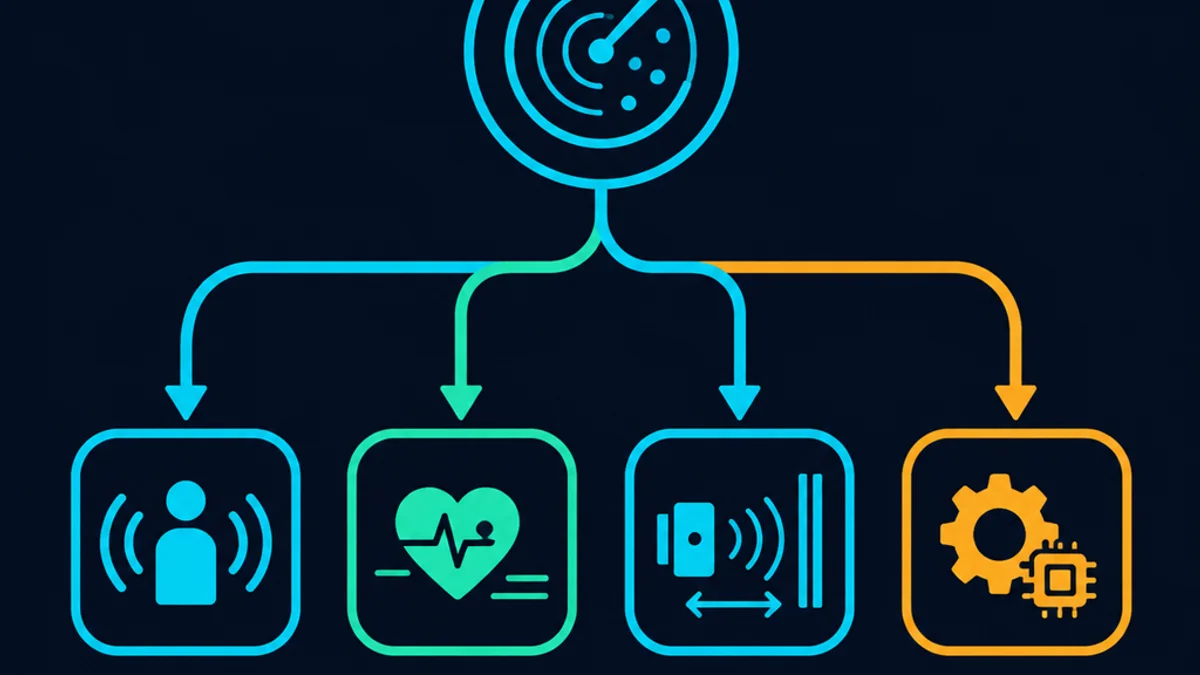
Finding the right radar module for sale is less about grabbing the cheapest board and more about matching the sensor to your environment, detection goal, and development platform. Hobbyists, product teams, robotics builders, and IoT developers all need different levels of range, accuracy, documentation, and software support. This guide explains the main radar sensor options, what to check before buying, and how to choose a module that will not slow your project down later.
What should you look for before buying a radar module?
Before you buy, decide what the module must detect, where it will operate, and how you plan to connect it to your hardware. A basic motion sensor for a light switch does not need the same precision as a presence sensor, people-counting device, robot obstacle detector, or industrial monitoring system. The best choice is usually the module that fits your use case with the least extra hardware, coding, and calibration.
A good buying decision starts with a few practical questions. Do you need simple motion detection or detailed distance and speed data? Will the sensor sit indoors, outdoors, behind plastic, or inside an enclosure? Are you prototyping with Arduino, Raspberry Pi, ESP32, or a custom board? These details shape everything from sensor type to interface, power requirements, and software complexity.
If you are comparing a radar module for sale across different suppliers, avoid judging by price alone. The lowest-cost option may be fine for a quick experiment, but poor documentation or unclear pinouts can cost hours of debugging. For commercial or repeatable projects, support materials, stable supply, and predictable performance often matter as much as the board itself.

Radar modules fit several common use cases
Radar sensing is popular because it can detect motion or presence without relying on visible light. Unlike a camera, it does not need to capture an image. Unlike many optical sensors, it can often work through certain non-metallic covers, depending on the material, thickness, sensor design, and installation.
That makes radar useful in projects where privacy, lighting, dust, or enclosure design are important. A developer might use a compact module to trigger lighting, wake a display, detect occupancy, support a smart home device, or add motion awareness to a robot. A more advanced radar sensor may be used for distance measurement, gesture detection, people tracking, or speed estimation.
Common applications include:
- Smart lighting and automation: Detect motion or presence so lights, fans, displays, and devices respond automatically.
- Security and access systems: Sense movement near doors, windows, entry points, storage areas, or restricted spaces.
- Robotics and mobility: Help a robot identify obstacles, movement, or nearby objects in its operating area.
- IoT monitoring: Add low-profile sensing to connected products without using cameras.
- Industrial and commercial prototypes: Test object detection, occupancy sensing, or non-contact measurement before designing a custom solution.
The practical benefit is flexibility. A small, affordable module may be enough for proof-of-concept work, while a higher-end mmWave board may provide richer data for teams building a finished product.
The main radar sensor types you will see for sale
When searching for a radar sensor for sale, you will usually see two broad categories: simple microwave Doppler modules and more advanced mmWave radar modules. Both use radio-frequency signals, but they are designed for different levels of sensing detail.
Microwave Doppler modules
Microwave Doppler radar modules are often chosen for basic motion detection. Popular low-cost examples include boards in the RCWL-style family, which are commonly used in hobby electronics and simple automation projects. These modules generally detect movement rather than producing detailed object maps.
They can be attractive because they are compact, inexpensive, and relatively easy to test with microcontrollers. For example, a module may provide a simple digital output that changes when motion is detected. That makes it approachable for Arduino-style projects where the goal is to turn something on, log an event, or trigger a simple response.
The tradeoff is limited control and limited information. Many basic Doppler modules do not tell you exactly how far away an object is, how many objects are present, or whether a stationary person is still in the room. They are best when “movement happened” is enough.
mmWave radar modules
mmWave radar modules are typically used when you need more precision. Depending on the module and chipset, they may support distance sensing, speed measurement, presence detection, zone detection, gesture experiments, or multi-target tracking. They may also come with configuration tools, demos, software development kits, or source code.
These modules are useful when your project needs more than a simple motion trigger. For example, a smart building product might need to distinguish between passing motion and continued occupancy. A robotics project may need distance-related data instead of a basic on-off signal. A product team may need access to raw or processed data so they can tune detection behavior.
The tradeoff is complexity. mmWave modules can require more careful mounting, configuration, data parsing, and software integration. They are often worth it, but only if your project actually needs the extra detail.
Basic motion detection and advanced sensing are not the same
A common mistake is assuming every radar module works like every other radar sensor. In practice, “radar” can mean anything from a simple motion switch to a data-rich sensing platform. Knowing the difference helps you avoid buying a board that cannot support your final design.
Basic motion detection is best for simple triggers. If someone moves near the sensor, the output changes. This is useful for lighting, alerts, toys, entry detection, and quick experiments. It is usually simple to wire, easy to code, and affordable.
Advanced sensing is different. It may provide information about distance, speed, angle, presence, or multiple detection zones. This can support more refined behavior, such as keeping a device active while a person remains seated, detecting movement direction, or filtering out unwanted triggers. However, the richer the data, the more your firmware or software needs to handle.
Use this quick decision guide:
- Choose a simple Doppler module if your project only needs to know whether motion is present.
- Choose a presence-focused radar sensor if your device must detect people who may move very little.
- Choose an mmWave development module if you need configurable detection zones, distance data, or richer software support.
- Choose an industrial or product-ready sensor if your project requires stable supply, clear documentation, enclosure guidance, and repeatable performance.
This distinction matters when you buy radar sensor hardware because the wrong level of capability can force you into workarounds. A cheap module may become expensive if it cannot produce the data your application needs.

Integration support can make or break the project
The best radar module is not just the one with the strongest specifications. It is the one you can connect, configure, test, and maintain without unnecessary friction. That is why integration support should be part of your buying checklist.
For hobby and prototype work, look for compatibility with the platforms you already use. Arduino and Raspberry Pi are common choices, but they do not connect to every module in the same way. Some modules use a simple digital output. Others may use UART, I2C, SPI, USB, or another interface. Your controller must support the interface, voltage level, and data rate required by the sensor.
Software matters too. A module with example code, a configuration utility, a clear command reference, or an SDK can save significant development time. This is especially true for mmWave sensors, where tuning thresholds, detection zones, and output data formats can be more involved.
Before buying, check for:
- Pinout clarity: The module should clearly identify power, ground, output, and communication pins.
- Voltage requirements: Confirm that your board can safely power and read the module.
- Interface type: Make sure your controller supports the module’s output method.
- Example projects: Demo code can help you verify the sensor quickly.
- Configuration tools: Useful for adjusting range, sensitivity, zones, or reporting behavior.
- Documentation quality: Clear setup notes reduce guesswork and wiring errors.
- Mechanical details: Dimensions, mounting holes, and antenna clearance can affect enclosure design.
If a listing does not explain these points, proceed carefully. It may still be a good component, but you should expect more experimentation.
Where can you buy a radar sensor with confidence?
You can buy a radar sensor from electronics distributors, manufacturer stores, specialist sensor suppliers, maker marketplaces, and general e-commerce platforms. The safest source depends on whether you need one module for testing or a reliable supply path for ongoing production. For anything beyond casual experimentation, prioritize sellers that provide documentation, support, and clear product identification.
A reputable seller should make it easy to understand what you are buying. The listing should identify the sensor type, operating concept, interface, supply voltage, approximate detection capability, included accessories, and available software resources. If the page only shows a vague product name and a few photos, you may not know whether the board is compatible with your project until it arrives.
For small experiments, general marketplaces can be convenient. For serious prototyping, it is often better to work with suppliers that specialize in electronics components or radar sensing. They are more likely to provide datasheets, application notes, support contacts, and consistent stock.
When reviewing a seller, look for signals such as:
- Clear module name, version, and chipset or sensor family when available.
- Downloadable datasheets or user guides.
- Real product photos and labeled connection diagrams.
- Return policy and warranty information.
- Shipping options, estimated lead times, and regional availability.
- Support channels for technical questions.
- Consistent product descriptions across the listing, datasheet, and packaging.
Pricing can vary widely depending on capability, documentation, accessories, and seller support. A simple motion module may be positioned as a low-cost component, while an advanced mmWave development board with tools and examples may cost more. Instead of chasing the lowest price, compare the total value: hardware, documentation, software, support, and delivery reliability.
Availability, pricing, and promotions need a closer look
Because radar modules are sold through many channels, listings can change often. Stock levels, shipping times, discounts, bundles, and regional availability may differ by seller. A promotion may look attractive, but it should not distract from the basics: authenticity, compatibility, and support.
If you see a seasonal discount, bundle offer, or price-match claim, read the details carefully. A lower price is useful only if the module is the right version, includes the expected accessories, and can be delivered within your project timeline. Holiday periods and regional logistics can also affect lead times, so order earlier if your schedule is tight.
For team purchases or commercial development, it is wise to document the exact module version used in your prototype. This helps prevent accidental substitutions later. If you expect to buy more units, ask whether the supplier can provide consistent stock or recommend a product-ready version.
A practical buying process might look like this:
- Shortlist two or three modules that match your sensing need.
- Confirm interface, voltage, and software support.
- Read the datasheet or setup guide before ordering.
- Order a small quantity for testing before committing to volume.
- Test in the real environment, not only on a desk.
- Record configuration settings, wiring, firmware version, and supplier details.
- Reorder only after confirming the module performs reliably in your use case.
This approach reduces the risk of buying a sensor that looks suitable online but fails under real installation conditions.
Practical selection tips for different buyers
Different buyers value different things. A hobbyist may want easy wiring and low cost. A startup may need a module that supports fast proof-of-concept work. An engineering team may care most about repeatability, documentation, and long-term sourcing.
If you are building a simple automation project, start with a module that has straightforward output and community examples. You will learn faster if the wiring and code are simple. Once the basic behavior works, you can decide whether you need more precision.
If you are developing a connected product, choose a module with stronger documentation and software tools from the beginning. A board that supports configuration and provides usable example code can shorten iteration time. It also helps your team evaluate edge cases, such as false triggers, mounting position, and enclosure effects.
If you are buying for a business or lab, consider more than the first unit cost. Ask whether the seller can support repeat orders, provide technical documentation, and help with product transitions. A slightly more expensive module may be the better choice if it reduces delays and uncertainty.
Testing before final installation protects your timeline
Radar performance depends on placement, enclosure materials, nearby objects, and the kind of motion or presence you expect to detect. A module that works on a bench may behave differently when mounted inside a product, behind a cover, near metal, or in a busy environment. Testing early helps reveal these issues before they become design problems.
Run tests that reflect your real use case. If the sensor will detect people in a room, test seated people, walking people, and people near the edge of the expected detection area. If it will support robotics, test moving objects, stationary obstacles, and the sensor’s response during vibration or movement. If it will be installed outdoors or near machinery, consider interference, temperature, enclosure design, and mounting stability.
A useful test checklist includes:
- Verify stable power under normal operating conditions.
- Confirm the module output matches your controller logic.
- Test minimum and maximum practical detection distances.
- Observe false triggers from fans, vibration, pets, doors, or nearby equipment.
- Check performance through the intended enclosure material.
- Record configuration settings so results can be repeated.
- Compare results across more than one unit if the project will scale.
Testing does not need to be complicated, but it should be intentional. The goal is to learn whether the sensor behaves correctly in the environment where it will actually be used.
Final takeaway
A good radar buying decision starts with the use case, not the listing. Simple Doppler modules are useful for affordable motion detection, while advanced mmWave sensors are better suited for projects that need richer data, configuration options, or software support. When searching for a radar module for sale, compare compatibility, documentation, seller reliability, and real-world performance before focusing on price.
If you are ready to buy radar sensor hardware, shortlist modules by sensing goal, confirm integration details, and test in the final environment before scaling up. The right radar sensor for sale is the one that gives your project the detection capability it needs without adding unnecessary complexity.
Not sure which sensor fits your project?
Talk to our mmWave application engineers for a free consultation.
Specify your hotel project with our engineers
Send your room count, ceiling type, and protocol preference. We will return a sample plan and quote within 24 business hours.
- Move from general guidance into a product or application discussion.
- Use RFQ when pricing, drawings, MOQ, or launch timing needs structure.
- Keep a direct contact path visible for fast clarifications and handoff.